Skip to content

Month: February 2008

Guitar effects

Oh, yeah. I love guitar effects.

Any good guitar player will tell you that you have to start with a good instrument, learn good technique and tone, and have a quality amplifier. I agree. I also agree with those who say that the lion’s share of tone comes from one’s fingers. Once you have that foundation, though, it’s a blast to step on a little pedal and totally transform your clean, pretty sounds into a raging troop of screaming monkeys, fire-breathing helicopters, rude buzzsaws, and modulated head trips.

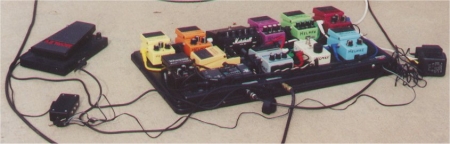
Here are some of my toys.
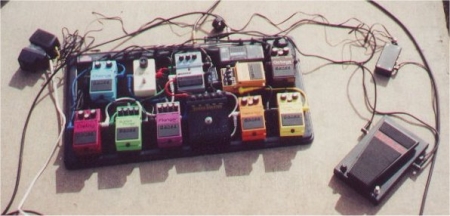
The pedals I include on the board changes regularly, and not all of my effects are pictured. Here are some notes on a few of the pedals and some favorite settings. For the settings, pretend all of the knobs are labeled 1-10.

Boss OC-2 Octave (octave 2: 3, direct: 4, octave 1: 6)

Morley PWA Wah(level: 4)

DOD FX 30-B Noise Gate/Loop. (release: 3, gate: 5, sensitivity: 9)

Boss AC-2 Acoustic Simulator (level: 9, body 4, top: 4, mode: enhance)

Boss SD-1 Super Overdrive (level: 3, tone: 7, drive: 4.5)

Marshall ShredMaster (gain: 8, bass: 4, contour: 2, treble: 10, volume: 5)

Boss DS-1 Distortion (tone: 7, level: 3, distortion: 10) (I’m simulating a fuzz with this setting)

MXR Micro Amp (gain: 6) (I am using this to counteract signal loss since I have so many pedals. It works great.)

Boss BF-2 Flanger (manual: 5, depth: 9, rate: 5, res.: 2)

Boss PH-2 Super Phaser (rate: 6, depth: 9, res.: 2, mode: I)

Boss DM-2 Delay (rate: 6, echo: 4, intensity: 1)(This may be the best delay I have ever heard)

Boss CE-2 Chorus (rate: 4, depth: 8 )

Ibanez LF7 Lo-Fi Filter (drive: 5, lo cut: 8, hi cut: 2, level: 6, mode: guitar)(this does a great job of imitating the “cheap transistor amp” or megaphone sound, I really like it when used with other effects like my pseudo fuzz setting on the DS-1)

All settings listed are subject to change at my whim, but this is where I had them the day the pics were taken.

As you can see, I am partial to the Boss pedals. You can use ’em, abuse ’em, and they just keep working. Fact is, I haven’t had any trouble with any of my pedals, but they are all well built. I am a little skeptical of plastic pedals, even if they sound good, so all my pedals are in sturdy steel cases. The Marshall ShredMaster is probably my best deal–I found it at a pawn shop and only paid $15 for it, in near mint condition!! I’m also in love with the Boss DM-2 and SD-1.

I have a few more not pictured. If there is interest, I’ll post again on the topic and include them in the future.

Silly date ideas for Valentine’s Day

Well, since everyone responded so well to my last post with a list in it, I thought I would share another. I have been married for more than 15 years to an amazing woman that I love and respect greatly. When you are in a relationship for a long time, it can be easy to get into a rut. Here are some (often silly) ideas to spice things up. Really, this is just for laughs, unless you are with a significant other with a great sense of humor like mine. However, if you use one and it works, please comment and say so! If you have any other good or goofy ideas, I would love to hear those as well. (This is originally from xkcd.com and can be seen via the Internet Archive. Thanks to mermshaus for finding the original and giving me a heads up in comment #4. I had completely forgotten where I originally found this list.)

1. Pretend you’ve never met, then loudly try out lame pickup lines in a upscale cafe. Act like they worked.

2. Go on a walking journey and every fifteen feet draw a chalk arrow in the direction you’re going. At the end of the trip, leave a big pile of chalk.

3. Create photo evidence suggesting that you went on an adventure that didn’t really happen.

4. Go for a drive. You can only make right-hand turns. When you finally get stuck, turn around and then you can only make left-hand turns. Repeat until you find something interesting. Take pictures along the way!

5. Build forts out of furniture and blankets, and wage war with paper airplanes.

6. Go to a major chain bookstore, and leave notes to future readers in copies of your favorite books.

7. Write a piece of fiction together. Outside at a cafe. Ask strangers when you get stuck.

8. Try and visit as many people as you can in one night, and turn as many things inside their apartment upside down as you can, without them noticing.

9. Do the lamest tourist thing in your area that you have both secretly wanted to do forever. Have an unabashed good time!

10. Hide and seek in the park.

11. Go around the city with sidewalk chalk and draw hearts with equations inside on random things.

12. Drive somewhere unknown and have dinner in a city you’ve never been to. With fake names.

13. Go for a drive with the passenger blindfolded, choosing directions at random. see where you end up.

14. Dress up as pirates, commandeer shopping carts, and have a war upon the high seas.. er, parking lot.

15. Go on a search for as many good climbing trees as possible, climb as high as you both can in all of them, compile photo evidence.

16. Rent a movie you’ve never seen before. Set on mute and improvise dialogue.

17. Dress up as pirates and go parrot shopping at local pet stores.

18. Go to the airport, get the cheapest, soonest departing flight to anywhere when you show up, and stay there for a weekend.

19. Walk around a city and perform short silent plays in front of security cameras.

20. In the middle of the night, drive to the beach, so you arrive just as the sun is rising. Have a breakfast picnic, then fall asleep together. Bring a sun umbrella.

What is the coolest thing you can do using Linux that you can’t do with Windows or on a Mac?

Someone asked me this recently. I don’t have just one answer. I compiled a list of things I thought of and emailed it to my friend…then I thought I would post it here for future reference. Feel free to add to the list! There is also a forums thread on the same topic, that I remembered as I complied my thoughts, so I stole some of the ideas posted there.

1. Upgrade to the newest version legally and without paying money
2. Have the latest version of the operating system run faster than the previous version on the same hardware
3. Easily install and run different graphical interfaces if I don’t like the default setup
4. Install twenty programs with one command
5. Have the system automatically update all my installed programs for me.
6. Install the same copy of my OS (Ubuntu) on multiple computers without worrying about license restrictions or activation keys
7. Give away copies of the operating system and other programs that run on it without breaking any laws, governmental or ethical or moral, because it was all intended to be used this way
8. Have full control over my computer hardware and know that there are no secret back doors in my software, put there by malicious software companies or governments
9. Run without using a virus scanner, adware/spyware protection, and not reboot my computer for months, even when I do keep up with all of the latest security updates
10. Run my computer without needing to defragment my hard drive, ever
11. Try out software, decide I don’t like it, uninstall it, and know that it didn’t leave little bits of stuff in a registry that can build up and slow down my machine
12. Make a major mistake that requires a complete reinstallation and be able to do it in less than an hour, because I put all of my data on a separate partition from the operating system and program files
13. Boot into a desktop with flash and effects as cool as Windows Vista on a three year old computer…in less than 40 seconds, including the time it takes me to type my username and password to login
14. Customize anything I want, legally, including my favorite programs. I can even track down the software developers to ask them questions, contribute ideas, and get involved in the actual design/software writing process if I want to
15. Have 4+ word processor windows open working on papers, listen to music, play with flashy desktop effects, have contact with a largely happy community and have firefox, instant messaging, and email clients all open at the same time, without ever having had to beg someone for a code to make my os work, and without the system running so slow it is useless
16. Use the command “dpkg –get-selections > pkg.list” to make a full, detailed list of all software I have installed, backup my /etc and /home directories on a separate partition, and you are able to recover your system any time, easily
17. Run multiple desktops simultaneously, or even allow multiple users to log in and use the computer simultaneously
18. Resize a hard disk partition without having to delete it and without losing the data on it
19. Use the same hardware for more than 5 years before it really needs to be replaced…I have some hardware that is nearly 10 years old, running Linux, and still useful
20. Browse the web while the OS is being installed!
21. Use almost any hardware and have a driver for it included with the operating system…eliminating the need to scour the internet to find the hardware manufacturer’s website to locate one
22. Get the source code for almost anything, including the OS kernel and most of my applications

I could go on, but that’s long enough. 🙂

Automatic MySQL backups using PHP

Okay, as pointed out in a comment on my last post, there are lots of ways to do this sort of thing. Many (most?) real sysadmins would probably choose to write a short shell script. Here’s the deal: I actually like PHP. Anyway, in my last post I shared a way to do site backups using PHP. Here’s a short followup, how to backup a MySQL database using PHP. You can put this script into the same file as the last script, to be run by a cron job, or you can do this at a different time. Like the last one, this script also originated from this site.

I hope someone finds this useful. 🙂

Again, sorry for the crossed out lines in the beginning of the script when the system command is called. My blog software uses a double dash to initialize and terminate the strikeout, and for some reason, even though the text is set as “preformatted,” parts are still being struck out. I presume it is because of the presence of quotation marks in the line. The interior of the line should read

mysqldump –user=$dbuser –password=$dbpswd –host=$host $mysqldb

 <?php $emailaddress = "yourname@emailaddress.com"; $host="localhost"; // database host $dbuser="weird_user_name"; // database user name $dbpswd="strong_password"; // database password $mysqldb="important_data"; // name of database $filename = "~/sqlbackup_important_data." . date("d") . ".sql"; if ( file_exists($filename) ) unlink($filename); system("mysqldump user=$dbuser password=$dbpswd --host=$host $mysqldb > $filename",$result); $size = filesize($filename); switch ($size) {   case ($size>=1048576): $size = round($size/1048576) . " MB"; break;   case ($size>=1024): $size = round($size/1024) . " KB"; break;   default: $size = $size . " bytes"; break; } $message = "The database backup for " . $mysqldb . " has been run.\n\n"; $message .= "The return code was: " . $result . "\n\n"; $message .= "The file path is: " . $filename . "\n\n"; $message .= "Size of the backup: " . $size . "\n\n"; $message .= "Server time of the backup: " . date(" F d h:ia") . "\n\n"; mail($emailaddress, "important_data db backup" , $message, "From: Website <>"); ?>