Skip to content

Month: December 2008

My experience with System76

I recently bought a new computer from System76 with Ubuntu pre-installed, because I want to support companies who are supportive of Free and Open Source Software. This was my experience.

Before I ordered the machine, I spent some time reading several pages of questions and answers from their support forum, housed at the official Ubuntu Forums. A quick disclaimer: I am an administrator for the Ubuntu Forums.

Later, I emailed their support team with several questions. They responded quickly and answered every one to my satisfaction.

I also compared configurations and prices with several other Linux pre-installed retailers such as Dell, ZaReason, Los Alamos, and R Cubed, each of whom offer products I think look good. In the end, I liked the price and performance specs of System76’s Pangolin Performance best, and decided to order it.

Of course, I was not content with the default configuration, even though it looked quite nice, so I bumped up the specs a bit. Here are the details, including the price paid.

System76 Pangolin Performance (PAN-P4) = $1,049.00
Bluetooth
Display Resolution 15.4″ WSXGA+ Super Clear Glossy LCD (1680 x 1050)
Video Card nVidia GeForce 9300M GS 256MB DDR2
Hard Drive 320 GB 7200 RPM SATA II
Hardware Warranty 1 Yr. Ltd. Warranty and Technical Support
Memory 4 GB – DDR2 800 MHz – 2 DIMMs
Operating System Ubuntu 8.10 (Intrepid Ibex) 64 Bit Linux
Optical Drive CD-RW / DVD-RW
Processor Core 2 Duo T5800 2.0 GHz 800 MHz FSB 2 MB L2 (35 Watt)
Gigabit LAN (10/100/1000)
Wireless Intel Wi-Fi Link 5100 – 802.11A/B/G/N Up to 300 Mbps
Built-In Webcam

The computer was delayed a little. I emailed to ask what was going on and was answered within the hour with details. After a few days, I was given an apology for further delay and a free shipping upgrade to the next quicker option. That was nice, and the communication was very well appreciated.

When the system arrived, it was well packaged and everything arrived in perfect condition. All the cables and such were there. In all, the shipment included the laptop itself, with battery, an AC adapter, a telephone/modem cord, a Windows-focused manual that came from the whitebox manufacturer (Clevo, I believe), two nicely produced documentation sheets from System76 for getting things up and running and learning how to use the laptop’s features within Ubuntu, and a nifty polishing cloth for cleaning the glossy screen and shell.

System76 Pangolin Performance

The colorful sheet to the right of the picture includes a simple three step process for getting started. First, you plug the system in and turn it on. Second, once the computer boots into an OEM install of Ubuntu, you create your main user account. Third, you enjoy your system. The back side of the sheet includes instructions for installing a special driver package that System76 provides to ensure that you get the full hardware capability of your laptop. The process was quick and painless.

Here we are, up and running. I like to put clear adhesive backed plastic (that’s shelf paper, for you Americans) on either side of the touchpad on my laptops, as I have been known to wear through the finish on them in the past. This also gives me a place to put my Ubuntu business card with my contact info.
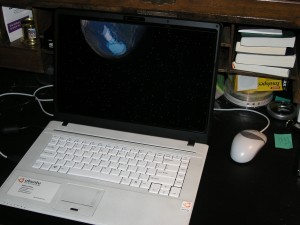
Keyboard and screen view of System76 Pangolin Performance

I am pleased to report that following these instructions results in a computer that “just works.” The 3D graphics, including Ubuntu’s fun Compiz visual effects, the video camera, Bluetooth, wireless internet, suspend, hibernate… In fact, everything I have tested works with no configuration needed, other than to personalize the experience! Now, I haven’t used the fingerprint reader, and have no plan to do so, so I should caution readers that I don’t know whether it works or not.

*EDIT: I just discovered that the System76 driver bundle includes everything necessary for the fingerprint reader to work, tested it, and can confirm it works beautifully. Wow!

I was concerned at first since the computer came with the 64-bit version of Ubuntu, and I have only used the 32-bit version in the past after having trouble with the 64-bit version in a much earlier release a couple years ago. I have had no problems doing anything with it that I wanted to do.

In short, I have built my own computers in the past, bought Windows computers pre-built and installed Ubuntu over or alongside that OS, and bought an Ubuntu pre-installed computer from Dell for my wife. Each method has its benefits. However, I have to say that this was the easiest and most enjoyable experience I have had.

Drupal 6 Themes

I have used Drupal to administer sites for years. It is flexible, powerful, and relatively easy to use. The one area of Drupal where I have been weak is theming. Generally, I have used contributed themes, maybe modifying colors, logos, and other simple things.

The one or two times I felt ambitious and tried to read through the documentation in order to learn how to create my own theme from scratch, I either got distracted by life, or found myself getting tired of the search and wishing I had all of the information I needed in one place to learn how to create a theme.

This week, I have been reading a book on precisely this topic called Drupal 6 Themes.

The book has impressed me. It is well-written, using clear language, useful diagrams and figures, and a logical progression of ideas. It starts with the basics, talking about what a theme is and defining its components. Then, it moves into the details of modifying the default themes. Up to this point, I didn’t encounter anything new to me, but I was only up to chapter two.

Starting with chapter three, the book reveals and clearly describes each of the files and elements that make up a theme, using both the default PHPTemplate engine as well as other options. Later, the book teaches how to use and master this template engine to create your own custom theme, including how to create custom looks for specific pages, modules, and more.

In between the two, you learn how to download ready-made themes, contributed by the Drupal user and developer community, and modify them for personal use, knowing how and where to look for usage restrictions to avoid problems.

Finally, the book ends with some very useful appendices that show where to find every css file and what it affects, and other useful tooks and kits for developers.

This book has saved me a lot of time, and is well done. If you are responsible for a site powered by Drupal, you may find it useful as well.

An interview with vor

Shawn Dennie, known as vor on the Ubuntu Forums, is one of our moderating staff. He is a programmer with a long technical history and being hired at 18 years old did wonders for his already-strong geek credibility. He is a world traveler, and an all-around interesting and good guy, and the subject of our latest in the community interview series.

1. Tell as much as you’re willing about your “real” life – name, age, gender, location, family, religion, profession, education, hobbies, etc.

My name is Shaun Dennie, I’m inching closer to 30 every day and can generally be found in Buenos Aires, Argentina (though, sometimes in Denver, Colorado or London, England).  I’m a self-proclaimed Techno-Hippie Semi-Buddhist and so don’t own anything that I can’t fit in my backpack.

I began attending (and almost graduated from) the South Dakota School of Mines and Technology at the age of 16 and was hired by Sun Microsystems at the age of 18 to work in their High Performance Libraries and Tools Group. Over the last 10 years I’ve worked various other software engineering jobs but, have spent a lot of time travelling in Europe, South America and Asia.

Over the last few years I’ve been moving away from writing proprietary software and now work in a hostel while dedicating most of my time to helping people with Ubuntu.  My hobbies include Ubuntu, going to watch my fúbol team (Club Atletico San Lorenzo de Almagro), relaxing with my friends and pretending to be a bartender at my favorite bar in Argentina (The Spot).

2. When and how did you become interested in computers? in Linux? in Ubuntu?

Like many people my age, I got interested in computers after watching movies like War Games and Weird Science.  My mother is an author so we had an 8086 machine fairly early (2 5.25 floppies and no hard drive). I learned how to use it and then one day a friend told me about this cool thing called a “BBS”.  I got a modem for Christmas and then figured out how to do ASCII art in exchange for membership for the for-pay BBSs because at the age of 12, I had no income to pay for them.

I started programming at 13 when a friend said, “It would be great to have the Dungeons and Dragons Monster Compendium on the computer and have it auto-generate loot”.  I figured out how to do just such a thing using GW-BASIC and then sold it to my friends for US$10 a copy and thus began my software engineering career.  Before starting at Sun, this career would also consist of taking bribes to ensure proper matches in a match-making program I wrote for a high-school Valentines Day fundraiser and writing a full casino software suite for the TI-85 calculator (and selling it for US$15 an install).

I got interested in Linux in 1997 when I built my first computer and, following in True Nerd Tradition, installed a copy of Slackware that I got out of the back of a Unix book.  I went on to learn more about Unix at Sun and found Ubuntu in 2005 when I wanted a Linux distro that worked on my new laptop without much hassle (and Ubuntu did!).

3. When did you become involved in the forums (or the Ubuntu community)? What’s your role there?

I started reading the forums in 2005 but I’d always been a lurker. I got brave one day in 2007 and started answering questions.  I enjoyed it and so just kept doing it.  I eventually joined the beginners team and was later invited to become a moderator for the forums.

4. Are you an Ubuntu member? If so, how do you contribute? If not, do you plan on becoming one?

I’m not currently an Ubuntu member, no. I plan to apply in the near future but, until recently my contributions have only been via the forums and I wanted to get involved more with the community here in Buenos Aires before applying.

5. What distros do you regularly use? What software? What’s your favorite application? Your least favorite?

I only run Ubuntu 8.04 on my laptop.  I have virtual machines setup for many popular distros and even Windows but, I run Ubuntu as the primary OS.

My favorite tools are vim and perl.  I once wrote a full featured mp3 player in vim (using mpg123) and generally get confused when using something that doesn’t have vi key bindings.

6. What’s your fondest memory from the forums, or from Ubuntu overall? What’s your worst?

Every time I’m able to help someone on the forums, I enjoy it.

My worst memory (though, now it’s funny to me) is when I hesitantly joined the IRC channel #ubuntu-meeting before a membership meeting to see how some friends did and the first thing I saw was, ” * vorian peers at vor-ubuntu”.  Since then, vorian has been peering/scowling/growling at me on a regular basis but, I find it less disconcerting now.

7. What luck have you had introducing new computer users to Ubuntu?

Most of my friends and family use Ubuntu now.  The key seems to be configuring it properly for them and then teaching them a few basic things.  The ones that are computer savvy to begin with quickly take the initiative to become Ubuntu experts and the ones who didn’t know much about computers in the first place have a very low barrier to entry and so quickly acclimate themselves to the new OS and sometimes even get excited about how easy it is to use.

I’m always surprised at how easily people figure out how to use Ubuntu. My mother knows nothing about computers but, she showed *me* how to sync an ipod on Ubuntu.  I installed Ubuntu on my fathers laptop and 10 minutes later he’d downloaded some games from the repos and was thoroughly enjoying himself.  I think when you give someone a non-mainstream OS, it challenges them prove their intelligence and they go out of their way figure out how things work.  I always find it funny when non-technical people say, “Well, I just use Ubuntu.” in sort of a bragging way.

8. What would you like to see happen with Linux in the future? with Ubuntu?

I’d like to see launchpad bug #1 fixed.

9. If there was one thing you could tell all new Ubuntu users, what would it be?

“Don’t Panic.”

The forums are a very friendly place and, if google isn’t giving you the answer you need, the forums probably will.

Trolling, rudeness, and a lack of manners

What is it about the internet that causes some people to act like it is suddenly okay to be rude, demeaning, or to speak/write/act in a way that would otherwise be obviously unacceptable in any human society?

I don’t actually expect an answer. I just needed to vent.

CUPS Administrative Guide

I was recently given a copy of a new book, CUPS Administrative Guide, to read and review. My initial thought was, “There is an entire book about the Common UNIX Printing System? Why?” You see, I have never had a problem configuring or using a printer with Linux, but my needs are simple, and I have always done my research first to see if the hardware is supported before purchase.

I received the book this week. Not only is CUPS much more powerful and configurable than I previously knew, but the book’s author does a very good job of discussing the system and its options clearly. Anyone working in a business or computer lab setting would find the book useful and probably more enjoyable and easier to parse than using man pages and Google searches. I think this is especially true in a place with multiple workstations, several shared printers, and users set up with individual accounts and in specific user groups.

My favorite feature in the book is that for most configuration options, multiple methods of making the changes are discussed. There is information on using the command line, using the CUPS web interface. Also wonderful is the detailed description of the major options for configuration file settings, and a useful comparison between the language used for configuring the Apache and CUPS daemons.